Interviews Questions, Algorithms, Aptitude, C Interview Program, C Theory Question, Aptitude Tricks, Test Series,

Saturday, 1 June 2019

C Pointers


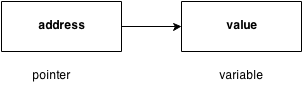
The pointer in C language is a variable which stores the address of another variable. This variable can be of type int, char, array, function, or any other pointer. The size of the pointer depends on the architecture. However, in 32-bit architecture, the size of a pointer is 2 byte.

Consider the following example to define a pointer which stores the address of an integer.

int n = 10;   
int* p = &n; // Variable p of type pointer is pointing to the address of the variable n of type integer.
   
Declaring a pointer
The pointer in c language can be declared using * (asterisk symbol). It is also known as indirection pointer used to dereference a pointer.

int *a;//pointer to int  
char *c;//pointer to char  

Pointer Example
An example of using pointers to print the address and value is given below.


As you can see in the above figure, pointer variable stores the address of number variable, i.e., fff4. The value of number variable is 50. But the address of pointer variable p is aaa3.

By the help of * (indirection operator), we can print the value of pointer variable p.

Let's see the pointer example as explained for the above figure.

#include<stdio.h>  
int main(){  
int number=50;    
int *p;      
p=&number;//stores the address of number variable    
printf("Address of p variable is %x \n",p); // p contains the address of the number therefore printing p gives the address of number.     

printf("Value of p variable is %d \n",*p); // As we know that * is used to dereference a pointer therefore if we print *p, we will get the value stored at the address contained by p.    

return 0;  
}    

Output
Address of number variable is fff4
Address of p variable is fff4
Value of p variable is 50

Pointer to array

int arr[10];  
int *p[10]=&arr; // Variable p of type pointer is pointing to the address of an integer array arr.  

Pointer to a function

void show (int);  
void(*p)(int) = &display; // Pointer p is pointing to the address of a function  

Pointer to structure
struct st {  
    int i;  
    float f;  
}ref;  
struct st *p = &ref;  
c pointers


Advantage of pointer

1) Pointer reduces the code and improves the performance, it is used to retrieving strings, trees, etc. and used with arrays, structures, and functions.

2) We can return multiple values from a function using the pointer.

3) It makes you able to access any memory location in the computer's memory.


Usage of pointer

There are many applications of pointers in c language.

1) Dynamic memory allocation
In C language, we can dynamically allocate memory using malloc() and calloc() functions where the pointer is used.

2) Arrays, Functions, and Structures
Pointers in c language are widely used in arrays, functions, and structures. It reduces the code and improves performance.


Address Of (&) Operator
The address of operator '&' returns the address of a variable. But, we need to use %u to display the address of a variable.

#include<stdio.h>  
int main(){  
int number=50;   
printf("value of number is %d, address of number is %u",number,&number);    
return 0;  
}    
Output
value of number is 50, address of number is fff4

NULL Pointer
A pointer that is not assigned any value but NULL is known as the NULL pointer. If you don't have any address to be specified in the pointer at the time of declaration, you can assign NULL value. It will provide a better approach.

int *p=NULL;
In the most libraries, the value of the pointer is 0 (zero).

Pointer Program to swap two numbers without using the 3rd variable.

#include<stdio.h>  
int main(){  
int a=10,b=20,*p1=&a,*p2=&b;  
  
printf("Before swap: *p1=%d *p2=%d",*p1,*p2);  
*p1=*p1+*p2;  
*p2=*p1-*p2;  
*p1=*p1-*p2;  
printf("\nAfter swap: *p1=%d *p2=%d",*p1,*p2);  
  
return 0;  
}  
Output
Before swap: *p1=10 *p2=20
After swap: *p1=20 *p2=10


Reading complex pointers

There are several things which must be taken into consideration while reading the complex pointers in C. Lets see the precedence and associativity of the operators which are used regarding pointers.

Operator Precedence Associativity

(), []               1              Left to right

*, identifier 2         Right to left

Data type         3        -


Here, we must notice that,


  • (): This operator is a bracket operator used to declare and define the function.
  • []: This operator is an array subscript operator
  • * : This operator is a pointer operator.
  • Identifier: It is the name of the pointer. The priority will always be assigned to this.
  • Data type: Data type is the type of the variable to which the pointer is intended to point. It also includes the modifier like signed int, long, etc).


How to read the pointer: int (*p)[10].

To read the pointer, we must see that () and [] have equal precedence. Therefore, their associativity must be considered here. The associativity is left to right, so the priority goes to ().

Inside the bracket (), pointer operator * and pointer name (identifier) p have the same precedence. Therefore, their associativity must be considered here which is right to left, so the priority goes to p, and the second priority goes to *.

Assign the 3rd priority to [] since the data type has the last precedence. Therefore the pointer will look like following.


  • char -> 4
  • * -> 2
  • p -> 1
  • [10] -> 3

The pointer will be read as p is a pointer to an array of integers of size 10.

Example

How to read the following pointer?

int (*p)(int (*)[2], int (*)void))  
Explanation

This pointer will be read as p is a pointer to such function which accepts the first parameter as the pointer to a one-dimensional array of integers of size two and the second parameter as the pointer to a function which parameter is void and return type is the integer.
Passing Array to Function in C


In C, there are various general problems which require passing more than one variable of the same type to a function. For example, consider a function which sorts the 10 elements in ascending order. Such a function requires 10 numbers to be passed as the actual parameters from the main function. Here, instead of declaring 10 different numbers and then passing into the function, we can declare and initialize an array and pass that into the function. This will resolve all the complexity since the function will now work for any number of values.

As we know that the array_name contains the address of the first element. Here, we must notice that we need to pass only the name of the array in the function which is intended to accept an array. The array defined as the formal parameter will automatically refer to the array specified by the array name defined as an actual parameter.

Consider the following syntax to pass an array to the function.

function-name(array name);//passing array  

Methods to declare a function that receives an array as an argument

There are 3 ways to declare the function which is intended to receive an array as an argument.

First way:
return_type function(type arrayname[])  
Declaring blank subscript notation [] is the widely used technique.

Second way:
return_type function(type arrayname[SIZE])  
Optionally, we can define size in subscript notation [].

Third way:
return_type function(type *arrayname)  


C language passing an array to function example

#include<stdio.h>  
int minarray(int arr[],int size){    
int min=arr[0];    
int i=0;    
for(i=1;i<size;i++){    
if(min>arr[i]){    
min=arr[i];    
}    
}//end of for    
return min;    
}//end of function    
    
int main(){      
int i=0,min=0;    
int numbers[]={4,5,7,3,8,9};//declaration of array    
min=minarray(numbers,6);//passing array with size    
printf("minimum number is %d \n",min);    
return 0;  
}    
Output
minimum number is 3

C function to sort the array

#include<stdio.h>   
void Bubble_Sort(int[]);  
void main ()    
{    
    int arr[10] = { 10,9,7,101,23,44,12, 78, 34, 23};     
    Bubble_Sort(arr);    
}    
void Bubble_Sort(int a[]) //array a[] points to arr.   
{  
int i, j,temp;     
    for(i = 0; i<10; i++)    
    {    
        for(j = i+1; j<10; j++)    
        {    
            if(a[j] < a[i])    
            {    
                temp = a[i];    
                a[i] = a[j];    
                a[j] = temp;     
            }     
        }     
    }     
    printf("Printing Sorted Element List ...\n");    
    for(i = 0; i<10; i++)    
    {    
        printf("%d\n",a[i]);    
    }  
}  
Output
Printing Sorted Element List ...
7  
9  
10  
12  
23 
23  
34  
44  
78  
101  

Returning array from the function

As we know, a function can not return more than one value. However, if we try to write the return statement as return a, b, c; to return three values (a,b,c), the function will return the last mentioned value which is c in our case. In some problems, we may need to return multiple values from a function. In such cases, an array is returned from the function.

Returning an array is similar to passing the array into the function. The name of the array is returned from the function. To make a function returning an array, the following syntax is used.

int * Function_name() {  
//some statements;   
return array_type;  
}  

To store the array returned from the function, we can define a pointer which points to that array. We can traverse the array by increasing that pointer since pointer initially points to the base address of the array. Consider the following example that contains a function returning the sorted array.

#include<stdio.h>   
int* Bubble_Sort(int[]);  
void main ()    
{    
    int arr[10] = { 10, 9, 7, 101, 23, 44, 12, 78, 34, 23};     
    int *p = Bubble_Sort(arr), i;  
    printf("printing sorted elements ...\n");  
    for(i=0;i<10;i++)  
    {  
        printf("%d\n",*(p+i));  
    }  
}    
int* Bubble_Sort(int a[]) //array a[] points to arr.   
{  
int i, j,temp;     
    for(i = 0; i<10; i++)    
    {    
        for(j = i+1; j<10; j++)    
        {    
            if(a[j] < a[i])    
            {    
                temp = a[i];    
                a[i] = a[j];    
                a[j] = temp;     
            }     
        }     
    }     
    return a;  
}  
Output
Printing Sorted Element List ...
7  
9   
10  
12  
23 
23  
34  
44  
78  
101  

Two Dimensional Array in C


The two-dimensional array can be defined as an array of arrays. The 2D array is organized as matrices which can be represented as the collection of rows and columns. However, 2D arrays are created to implement a relational database lookalike data structure. It provides ease of holding the bulk of data at once which can be passed to any number of functions wherever required.

Declaration of two dimensional Array in C

The syntax to declare the 2D array is given below.

data_type array_name[rows][columns];  

Consider the following example.

int twodimen[4][3];  
Here, 4 is the number of rows, and 3 is the number of columns.


Initialization of 2D Array in C

In the 1D array, we don't need to specify the size of the array if the declaration and initialization are being done simultaneously. However, this will not work with 2D arrays. We will have to define at least the second dimension of the array. The two-dimensional array can be declared and defined in the following way.

int arr[4][3]={{1,2,3},{2,3,4},{3,4,5},{4,5,6}};  


Two-dimensional array example in C

#include<stdio.h>  
int main(){      
int i=0,j=0;    
int arr[4][3]={{1,2,3},{2,3,4},{3,4,5},{4,5,6}};     
//traversing 2D array    
for(i=0;i<4;i++){    
 for(j=0;j<3;j++){    
   printf("arr[%d] [%d] = %d \n",i,j,arr[i][j]);    
 }//end of j    
}//end of i    
return 0;  
}    
Output
arr[0][0] = 1
arr[0][1] = 2
arr[0][2] = 3
arr[1][0] = 2
arr[1][1] = 3
arr[1][2] = 4
arr[2][0] = 3
arr[2][1] = 4
arr[2][2] = 5
arr[3][0] = 4
arr[3][1] = 5
arr[3][2] = 6


2D array example: Storing elements in a matrix and printing it.

#include <stdio.h>    
void main ()    
{    
    int arr[3][3],i,j;     
    for (i=0;i<3;i++)    
    {    
        for (j=0;j<3;j++)    
        {    
            printf("Enter a[%d][%d]: ",i,j);                
            scanf("%d",&arr[i][j]);    
        }    
    }    
    printf("\n printing the elements ....\n");     
    for(i=0;i<3;i++)    
    {    
        printf("\n");    
        for (j=0;j<3;j++)    
        {    
            printf("%d\t",arr[i][j]);    
        }    
    }    
}    
Output
Enter a[0][0]: 56   
Enter a[0][1]: 10   
Enter a[0][2]: 30  
Enter a[1][0]: 34  
Enter a[1][1]: 21 
Enter a[1][2]: 34    
Enter a[2][0]: 45
Enter a[2][1]: 56
Enter a[2][2]: 78   

 printing the elements .... 

56      10      30  
34      21      34  
45      56      78

C Array


An array is defined as the collection of similar type of data items stored at contiguous memory locations. Arrays are the derived data type in C programming language which can store the primitive type of data such as int, char, double, float, etc. It also has the capability to store the collection of derived data types, such as pointers, structure, etc. The array is the simplest data structure where each data element can be randomly accessed by using its index number.

C array is beneficial if you have to store similar elements. For example, if we want to store the marks of a student in 6 subjects, then we don't need to define different variables for the marks in a different subject. Instead of that, we can define an array which can store the marks in each subject at the contiguous memory locations.

By using the array, we can access the elements easily. Only a few lines of code are required to access the elements of the array.


Properties of Array

The array contains the following properties.


  • Each element of an array is of the same data type and carries the same size, i.e., int = 4 bytes.
  • Elements of the array are stored at contiguous memory locations where the first element is stored at the smallest memory location.
  • Elements of the array can be randomly accessed since we can calculate the address of each element of the array with the given base address and the size of the data element.


Advantage of C Array

1) Code Optimization: Less code to access the data.

2) Ease of traversing: By using the for loop, we can retrieve the elements of an array easily.

3) Ease of sorting: To sort the elements of the array, we need a few lines of code only.

4) Random Access: We can access any element randomly using the array.

The disadvantage of C Array

1) Fixed Size: Whatever size, we define at the time of declaration of the array, we can't exceed the limit. So, it doesn't grow the size dynamically like LinkedList which we will learn later.

Declaration of C Array
We can declare an array in the c language in the following way.

data_type array_name[array_size];  

Now, let us see the example to declare the array.
int marks[5];  

Here, int is the data_type, marks are the array_name, and 5 is the array_size.

Initialization of C Array
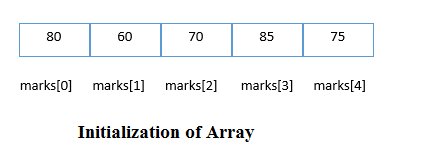
The simplest way to initialize an array is by using the index of each element. We can initialize each element of the array by using the index. Consider the following example.

marks[0]=80;//initialization of array  
marks[1]=60;  
marks[2]=70;  
marks[3]=85;  
marks[4]=75;
initialization of array in c language


C array example

#include<stdio.h>  
int main(){      
int i=0;    
int marks[5];//declaration of array       
marks[0]=80;//initialization of array    
marks[1]=60;    
marks[2]=70;    
marks[3]=85;    
marks[4]=75;    
//traversal of array    
for(i=0;i<5;i++){      
printf("%d \n",marks[i]);    
}//end of for loop     
return 0;  
}    
Output
80
60
70
85
75

C Array: Declaration with Initialization

We can initialize the c array at the time of declaration. Let's see the code.

int marks[5]={20,30,40,50,60};  
In such a case, there is no requirement to define the size. So it may also be written as the following code.

int marks[]={20,30,40,50,60};  
Let's see the C program to declare and initialize the array in C.

#include<stdio.h>  
int main(){      
int i=0;    
int marks[5]={20,30,40,50,60};//declaration and initialization of array    
 //traversal of array    
for(i=0;i<5;i++){      
printf("%d \n",marks[i]);    
}    
return 0;  
}    
Output
20
30
40
50
60

C Array Example: Sorting an array

In the following program, we are using the bubble sort method to sort the array in ascending order.

#include<stdio.h>    
void main ()    
{    
    int i, j,temp;     
    int a[10] = {10, 9, 7,101, 23,44,12, 78, 34, 23};     
    for(i = 0; i<10; i++)    
    {    
        for(j = i+1; j<10; j++)    
        {    
            if(a[j] > a[i])    
            {    
                temp = a[i];    
                a[i] = a[j];    
                a[j] = temp;     
            }     
        }     
    }     
    printf("Printing Sorted Element List ...\n");    
    for(i = 0; i<10; i++)    
    {    
        printf("%d\n",a[i]);    
    }    
}
     
Program to print the largest and second largest element of the array.

#include<stdio.h>  
void main ()  
{  
    int arr[100],i,n,largest,sec_largest;  
    printf("Enter the size of the array?");  
    scanf("%d",&n);  
    printf("Enter the elements of the array?");  
    for(i = 0; i<n; i++)  
    {  
        scanf("%d",&arr[i]);  
    }  
    largest = arr[0];  
    sec_largest = arr[1];  
    for(i=0;i<n;i++)  
    {  
        if(arr[i]>largest)  
        {  
            sec_largest = largest;  
            largest = arr[i];  
        }  
        else if (arr[i]>sec_largest && arr[i]!=largest)  
        {  
            sec_largest=arr[i];  
        }  
    }  
    printf("largest = %d, second largest = %d",largest,sec_largest);  
      
}  

Storage Classes in C


Storage classes in C are used to determine the lifetime, visibility, memory location, and initial value of a variable.
 There are four types of storage classes in C

  • Automatic
  • External
  • Static
  • Register


Automatic:


  • Automatic variables are allocated memory automatically at runtime.
  • The visibility of the automatic variables is limited to the block in which they are defined.
  • The scope of the automatic variables is limited to the block in which they are defined.
  • The automatic variables are initialized to garbage by default.
  • The memory assigned to automatic variables gets freed upon exiting from the block.
  • The keyword used for defining automatic variables is auto.
  • Every local variable is automatic in C by default.

Example 1:

#include <stdio.h>  
int main()  
{  
int a; //auto  
char b;  
float c;   
printf("%d %c %f",a,b,c); // printing initial default value of automatic variables a, b, and c.   
return 0;  
}  

Output:
garbage garbage garbage 

Example 2:

#include <stdio.h>  
int main()  
{  
int a = 10,i;   
printf("%d ",++a);  
{  
int a = 20;   
for (i=0;i<3;i++)  
{  
printf("%d ",a); // 20 will be printed 3 times since it is the local value of a  
}  
}  
printf("%d ",a); // 11 will be printed since the scope of a = 20 is ended.   
}  
Output:

  11 20 20 20 11

Static

  • The variables defined as static specifier can hold their value between the multiple function calls.
  • Static local variables are visible only to the function or the block in which they are defined.
  • A same static variable can be declared many times but can be assigned at only one time.
  • Default initial value of the static integral variable is 0 otherwise null.
  • The visibility of the static global variable is limited to the file in which it has declared.
  • The keyword used to define the static variable is static.

Example 1

#include<stdio.h>  
static char c;  
static int i;  
static float f;   
static char s[100];  
void main ()  
{  
printf("%d %d %f %s",c,i,f); // the initial default value of c, i, and f will be printed.   
}  
Output:
0 0 0.000000 (null)

Example 2
#include<stdio.h>  
void sum()  
{  
static int a = 10;  
static int b = 24;   
printf("%d %d \n",a,b);  
a++;   
b++;  
}  
void main()  
{  
int i;  
for(i = 0; i< 3; i++)  
{  
sum(); // The static variables holds their value between multiple function calls.    
}  
}  
Output:

10 24 
11 25 
12 26 

Register

  • The variables defined as the register is allocated the memory into the CPU registers depending upon the size of the memory remaining in the CPU.
  • We can not dereference the register variables, i.e., we can not use &operator for the register variable.
  • The access time of the register variables is faster than the automatic variables.
  • The initial default value of the register local variables is 0.
  • The register keyword is used for the variable which should be stored in the CPU register. However, it is compiler?s choice whether or not; the variables can be stored in the register.
  • We can store pointers into the register, i.e., a register can store the address of a variable.
  • Static variables can not be stored into the register since we can not use more than one storage specifier for the same variable.


Example 1:

#include <stdio.h>  
int main()  
{  
register int a; // variable a is allocated memory in the CPU register. The initial default value of a is 0.   
printf("%d",a);  
}  
Output:
0

Example 2
#include <stdio.h>  
int main()  
{  
register int a = 0;   
printf("%u",&a); // This will give a compile time error since we can not access the address of a register variable.   
}  
Output:

main.c:5:5: error: address of register variable ?a? requested
printf("%u",&a);
^~~~~~

External

  • The external storage class is used to tell the compiler that the variable defined as extern is declared with an external linkage elsewhere in the program.
  • The variables declared as extern are not allocated any memory. It is the only a declaration and intended to specify that the variable is declared elsewhere in the program.
  • The default initial value of external integral type is 0 otherwise null.
  • We can only initialize the extern variable globally, i.e., we can not initialize the external variable within any block or method.
  • An external variable can be declared many times but can be initialized at only once.
  • If a variable is declared as external then the compiler searches for that variable to be initialized somewhere in the program which may be extern or static. If it is not, then the compiler will show an error.

Example 1
#include <stdio.h>  
int main()  
{  
extern int a;   
printf("%d",a);  
}  
Output
main.c:(.text+0x6): undefined reference to `a'
collect2: error: ld returned 1 exit status

Example 2
#include <stdio.h>  
int a;   
int main()  
{  
extern int a; // variable a is defined globally, the memory will not be allocated to a  
printf("%d",a);  
}  
Output
0

Example 3
#include <stdio.h>  
int a;   
int main()  
{  
extern int a = 0; // this will show a compiler error since we can not use extern and initializer at same time   
printf("%d",a);  
}  
Output

compile time error 
main.c: In function ?main?:
main.c:5:16: error: ?a? has both ?extern? and initializer
extern int a = 0;

Example 4
#include <stdio.h>  
int main()  
{  
extern int a; // Compiler will search here for a variable a defined and initialized somewhere in the pogram or not.   
printf("%d",a);  
}  
int a = 20;  
Output

20

Example 5
extern int a;  
int a = 10;   
#include <stdio.h>  
int main()  
{  
printf("%d",a);  
}  
int a = 20; // compiler will show an error at this line   
Output
compile time error .

C Library Functions


Library functions are the inbuilt function in C that are grouped and placed at a common place called the library. Such functions are used to perform some specific operations.

 For example, printf is a library function used to print on the console. The library functions are created by the designers of compilers. All C standard library functions are defined inside the different header files saved with the extension .h. We need to include these header files in our program to make use of the library functions defined in such header files.

 For example, To use the library functions such as printf/scanf we need to include stdio.h in our program which is a header file that contains all the library functions regarding standard input/output.

The list of mostly used header files :

1) stdio.h: This is a standard input/output header file. It contains all the library functions regarding standard input/output.

2)conio.h:This is a console input/output header file.

3)string.h:It contains all string related library functions like gets(), puts(),etc.

4)stdlib.h:This header file contains all the general library functions like malloc(), calloc(), exit(), etc.

5)math.h:This header file contains all the math operations related functions like sqrt(), pow(), etc.

6)time.h: This header file contains all the time-related functions.

7)ctype.h: This header file contains all character handling functions.

8)stdarg.h: Variable argument functions are defined in this header file.

9)signal.h: All the signal handling functions are defined in this header file.

10)setjmp.h:This file contains all the jump functions.

11)locale.h:This file contains locale functions.

12)errno.h:This file contains error handling functions.

13)assert.h:This file contains diagnostics functions.

Different aspects of function calling


A function may or may not accept any argument. It may or may not return any value. Based on these facts, There are four different aspects of function calls.


  • function without arguments and without return value
  • function without arguments and with the return value
  • function with arguments and without return value
  • function with arguments and with the return value


Example of Function without argument and return value

Example 1

#include<stdio.h>  
void printName();  
void main ()  
{  
    printf("Hello ");  
    printName();  
}  
void printName()  
{  
    printf("Javatpoint");  
}  

Output
Hello Javatpoint

Example 2

#include<stdio.h>  
void sum();  
void main()  
{  
    printf("\nGoing to calculate the sum of two numbers:");  
    sum();  
}  
void sum()  
{  
    int a,b;   
    printf("\nEnter two numbers");  
    scanf("%d %d",&a,&b);   
    printf("The sum is %d",a+b);  
}  

Output

Going to calculate the sum of two numbers:
Enter two numbers 10 
24 

The sum is 34


Example for Function without argument and with return value

Example 1:

#include<stdio.h>  
int sum();  
void main()  
{  
    int result;   
    printf("\nGoing to calculate the sum of two numbers:");  
    result = sum();  
    printf("%d",result);  
}  
int sum()  
{  
    int a,b;   
    printf("\nEnter two numbers");  
    scanf("%d %d",&a,&b);  
    return a+b;   
}  

Output

Going to calculate the sum of two numbers:

Enter two numbers 10 
24 
The sum is 34

Example 2: 
program to calculate the area of the square

#include<stdio.h>  
int sum();  
void main()  
{  
    printf("Going to calculate the area of the square\n");  
    float area = square();  
    printf("The area of the square: %f\n",area);  
}  
int square()  
{  
    float side;  
    printf("Enter the length of the side in meters: ");  
    scanf("%f",&side);  
    return side * side;  
}  
Output

Going to calculate the area of the square 
Enter the length of the side in meters: 10 
The area of the square: 100.000000

Example for Function with argument and without return value

Example 1:

#include<stdio.h>  
void sum(int, int);  
void main()  
{  
    int a,b,result;   
    printf("\nGoing to calculate the sum of two numbers:");  
    printf("\nEnter two numbers:");  
    scanf("%d %d",&a,&b);  
    sum(a,b);  
}  
void sum(int a, int b)  
{  
    printf("\nThe sum is %d",a+b);      
}  
Output

Going to calculate the sum of two numbers:

Enter two numbers 10 
24 
The sum is 34

Example 2: 
program to calculate the average of five numbers.

#include<stdio.h>  
void average(int, int, int, int, int);  
void main()  
{  
    int a,b,c,d,e;   
    printf("\nGoing to calculate the average of five numbers:");  
    printf("\nEnter five numbers:");  
    scanf("%d %d %d %d %d",&a,&b,&c,&d,&e);  
    average(a,b,c,d,e);  
}  
void average(int a, int b, int c, int d, int e)  
{  
    float avg;   
    avg = (a+b+c+d+e)/5;   
    printf("The average of given five numbers : %f",avg);  
}  

Output

Going to calculate the average of five numbers:
Enter five numbers:10 
20
30
40
50
The average of given five numbers : 30.000000

Example for Function with argument and with return value

Example 1:

#include<stdio.h>  
int sum(int, int);  
void main()  
{  
    int a,b,result;   
    printf("\nGoing to calculate the sum of two numbers:");  
    printf("\nEnter two numbers:");  
    scanf("%d %d",&a,&b);  
    result = sum(a,b);  
    printf("\nThe sum is : %d",result);  
}  
int sum(int a, int b)  
{  
    return a+b;  
}  
Output

Going to calculate the sum of two numbers:
Enter two numbers:10
20 
The sum is : 30   

Example 2: 
Program to check whether a number is even or odd

#include<stdio.h>  
int even_odd(int);  
void main()  
{  
 int n,flag=0;  
 printf("\nGoing to check whether a number is even or odd");  
 printf("\nEnter the number: ");  
 scanf("%d",&n);  
 flag = even_odd(n);  
 if(flag == 0)  
 {  
    printf("\nThe number is odd");  
 }  
 else   
 {  
    printf("\nThe number is even");  
 }  
}  
int even_odd(int n)  
{  
    if(n%2 == 0)  
    {  
        return 1;  
    }  
    else   
    {  
        return 0;  
    }  
}  
Output

Going to check whether a number is even or odd
Enter the number: 100
The number is even

C Functions


In c, we can divide a large program into the basic building blocks known as function. The function contains the set of programming statements enclosed by {}. A function can be called multiple times to provide reusability and modularity to the C program. In other words, we can say that the collection of functions creates a program. The function is also known as procedure or subroutine in other programming languages.

Advantage of functions in C

There are the following advantages of C functions.


  • By using functions, we can avoid rewriting same logic/code again and again in a program.
  • We can call C functions any number of times in a program and from any place in a program.
  • We can track a large C program easily when it is divided into multiple functions.
  • Reusability is the main achievement of C functions.
  • However, Function calling is always overhead in a C program.


Function Aspects

There are three aspects of a C function.


  • Function declaration A function must be declared globally in a c program to tell the compiler about the function name, function parameters, and return type.


  • Function call Function can be called from anywhere in the program. The parameter list must not differ in function calling and function declaration. We must pass the same number of functions as it is declared in the function declaration.


  • Function definition It contains the actual statements which are to be executed. It is the most important aspect to which the control comes when the function is called. Here, we must notice that only one value can be returned from the function.


The syntax of creating function in c language is given below:

return_type function_name(data_type parameter...){ 
//code to be executed 


Types of Functions

There are two types of functions in C programming:

1. Library Functions: are the functions which are declared in the C header files such as scanf(), printf(), gets(), puts(), ceil(), floor() etc.

2. User-defined functions: are the functions which are created by the C programmer, so that he/she can use it many times. It reduces the complexity of a big program and optimizes the code.


Return Value

A C function may or may not return a value from the function. If you don't have to return any value from the function, use void for the return type.

Let's see a simple example of C function that doesn't return any value from the function.

Example without return value:

void hello(){ 
printf("hello c"); 


If you want to return any value from the function, you need to use any data type such as int, long, char, etc. The return type depends on the value to be returned from the function.

Let's see a simple example of C function that returns int value from the function.

Example with return value:

int get(){ 
return 10; 


In the above example, we have to return 10 as a value, so the return type is int. If you want to return floating-point value (e.g., 10.2, 3.1, 54.5, etc), you need to use float as the return type of the method.

float get(){ 
return 10.2; 

Now, you need to call the function, to get the value of the function.

Features of C Language


C is a widely used language. It provides many features that are given below.


  1. Simple
  2. Machine Independent or Portable
  3. Mid-level programming language
  4. structured programming language
  5. Rich Library
  6. Memory Management
  7. Fast Speed
  8. Pointers
  9. Recursion
  10. Extensible


1) Simple

C is a simple language in the sense that it provides a structured approach (to break the problem into parts), the rich set of library functions, data types, etc.


2) Machine Independent or Portable

Unlike assembly language, c programs can be executed on different machines with some machine specific changes. Therefore, C is a machine independent language.


3) Mid-level programming language

Although, C is intended to do low-level programming. It is used to develop system applications such as the kernel, driver, etc. It also supports the features of a high-level language. That is why it is known as mid-level language.


4) Structured programming language

C is a structured programming language in the sense that we can break the program into parts using functions. So, it is easy to understand and modify. Functions also provide code reusability.


5) Rich Library

C provides a lot of inbuilt functions that make the development fast.

6) Memory Management

It supports the feature of dynamic memory allocation. In C language, we can free the allocated memory at any time by calling the free() function.

7) Speed

The compilation and execution time of C language is fast since there are lesser inbuilt functions and hence the lesser overhead.

8) Pointer

C provides the feature of pointers. We can directly interact with the memory by using the pointers. We can use pointers for memory, structures, functions, array, etc.

9) Recursion

In C, we can call the function within the function. It provides code reusability for every function. Recursion enables us to use the approach of backtracking.

10) Extensible

C language is extensible because it can easily adopt new features.

Types of Variables in C


There are many types of variables in c:


  1. local variable
  2. global variable
  3. static variable
  4. automatic variable
  5. external variable


Local Variable
A variable that is declared inside the function or block is called a local variable.

It must be declared at the start of the block.

void function1(){  
int x=10;//local variable  
}  

You must have to initialize the local variable before it is used.

Global Variable
A variable that is declared outside the function or block is called a global variable. Any function can change the value of the global variable. It is available to all the functions.

It must be declared at the start of the block.

int value=20;//global variable  
void function1(){  
int x=10;//local variable  
}  

Static Variable
A variable that is declared with the static keyword is called static variable.

It retains its value between multiple function calls.

void function1(){  
int x=10;//local variable  
static int y=10;//static variable  
x=x+1;  
y=y+1;  
printf("%d,%d",x,y);  
}
  
If you call this function many times, the local variable will print the same value for each function call, e.g, 11,11,11 and so on. But the static variable will print the incremented value in each function call, e.g. 11, 12, 13 and so on.

Automatic Variable
All variables in C that are declared inside the block, are automatic variables by default. We can explicitly declare an automatic variable using the auto keyword.

void main(){  
int x=10;//local variable (also automatic)  
auto int y=20;//automatic variable  
}  

External Variable
We can share a variable in multiple C source files by using an external variable. To declare an external variable, you need to use extern keyword.

myfile.h
extern int x=10;//external variable (also global)  
program1.c
#include "myfile.h"  
#include <stdio.h>  
void printValue(){  
    printf("Global variable: %d", global_variable);  
}  

Variables in C


A variable is the name of the memory location. It is used to store data. Its value can be changed, and it can be reused many times.

It is a way to represent memory location through a symbol so that it can be easily identified.

Let's see the syntax to declare a variable:

type variable_list;  

The example of declaring the variable is given below:
int a;  
float b;  
char c; 

Here, a, b, c are variables. The int, float, char is the data types.

We can also provide values while declaring the variables as given below:

int a=10,b=20;
//declaring 2 variable of integer type  
float f=20.8;  
char c='A';  


Rules for defining variables:
A variable can have alphabets, digits, and underscore.
A variable name can start with the alphabet, and underscore only. It can't start with a digit.
No whitespace is allowed within the variable name.
A variable name must not be any reserved word or keyword, e.g. int, float, etc.

Valid variable names:
int a;  
int _ab;  
int a30;  

Invalid variable names:
int 2;  
int a b;  
int long;